PremiumSommo feature

Wine Insights: Journal and Cellar Analytics with AI

Your journal and cellar, charted.

Premium

Wine Insights: Journal and Cellar Analytics with AI

Your journal and cellar, charted.

Included with Premium subscription
Wine Insights screenshot
i.What you get

Three things to walk away with.

01

Journal Patterns

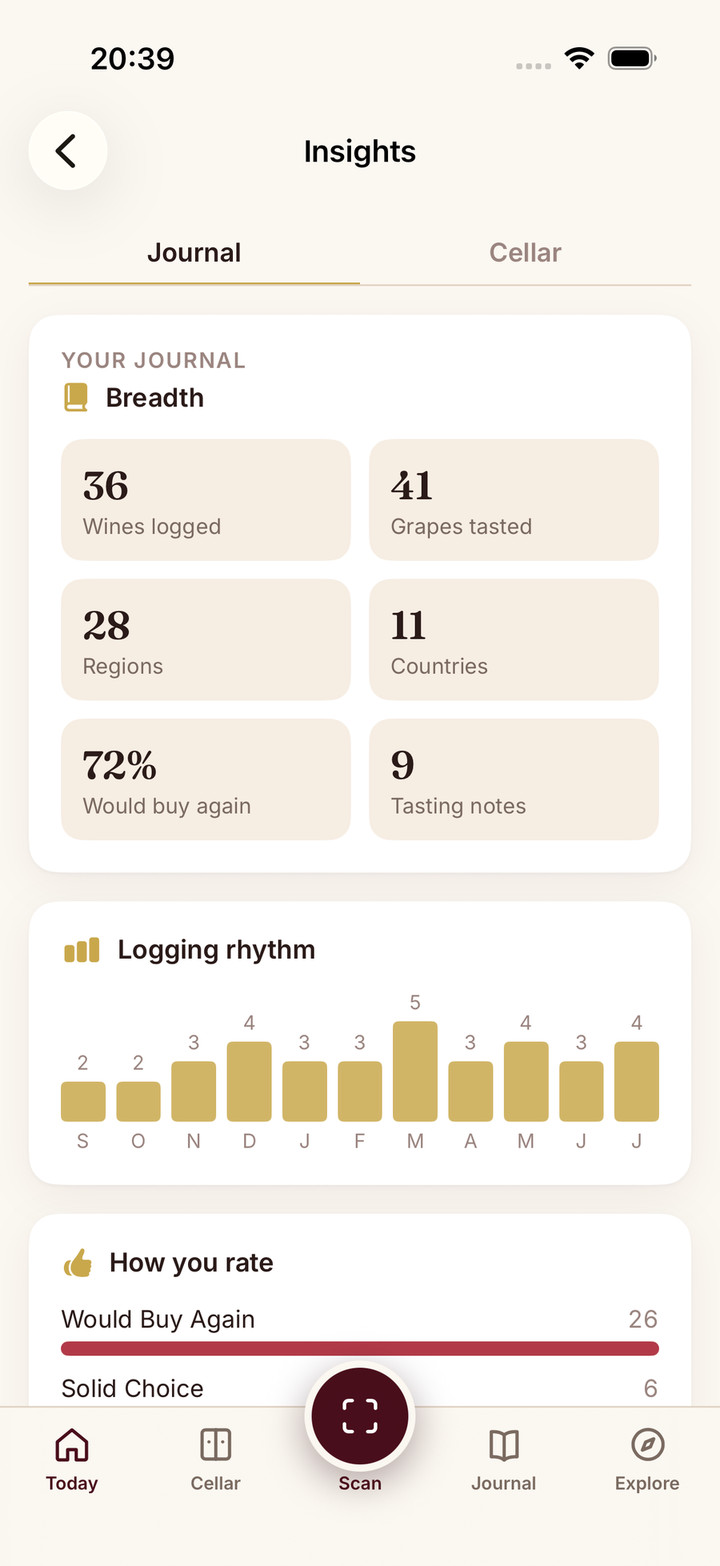
See rating distribution, favourite grapes and regions, colour mix, and a twelve-month logging rhythm built from every entry you saved.

02

Cellar Composition

Bottle-weighted stats across your collection: drinking-window mix, top grapes, countries, and styles on your racks.

03

AI That Connects the Dots

Segment narratives and entity insights reference your real journal and cellar data, with tappable grapes and regions to explore next.

ii.How it works

Step by step.

  1. Open Insights

    From Profile, Journal, or Cellar. Charts paint immediately from your data.

  2. Pick a segment

    Switch between Journal and Cellar when you have both. Scroll to the AI reading card when you want the narrative.

  3. Tap through

    Any grape or region chip opens the info sheet with your history and a What we noticed overview.

Your Collection, Read Back to You

Most wine apps stop at logging. Sommo Insights asks what your history is trying to tell you: which grapes you keep buying again, which regions you have explored but not cellared, which bottles are ready now versus still aging.

It is a Profile dashboard with two segments, Journal and Cellar, each built from real data you already logged. Numbers load instantly. AI commentary arrives when you are ready to read it.

Journal Insights

The journal segment mirrors how you actually taste in your personal wine journal:

  • Breadth — wines logged, grapes tasted, regions and countries explored, buy-again rate
  • Logging rhythm — a twelve-month activity chart
  • How you rate — distribution across Not For Me, Solid Choice, and Would Buy Again
  • Colour mix — reds, whites, rosés, and sparkling in your log
  • Top grapes, regions, and countries — tappable chips that open the same rich info sheets you get after a label scan

When you have enough entries, an AI reading card connects the dots in plain language and suggests what to explore next.

Sommo Insights dashboard showing the Journal segment with charts and an AI narrative card

Cellar Insights

The cellar segment is bottle-weighted, not just wine-count weighted, and reads the same inventory you track in your wine cellar:

  • Collection — total bottles and unique wines on your racks
  • Drinking window — how many bottles are too young, approaching peak, ready now, or past prime
  • By grape, country, and style — where your collection actually concentrates

The cellar AI narrative cross-references your journal taste where it helps, so recommendations stay personal rather than generic sommelier filler.
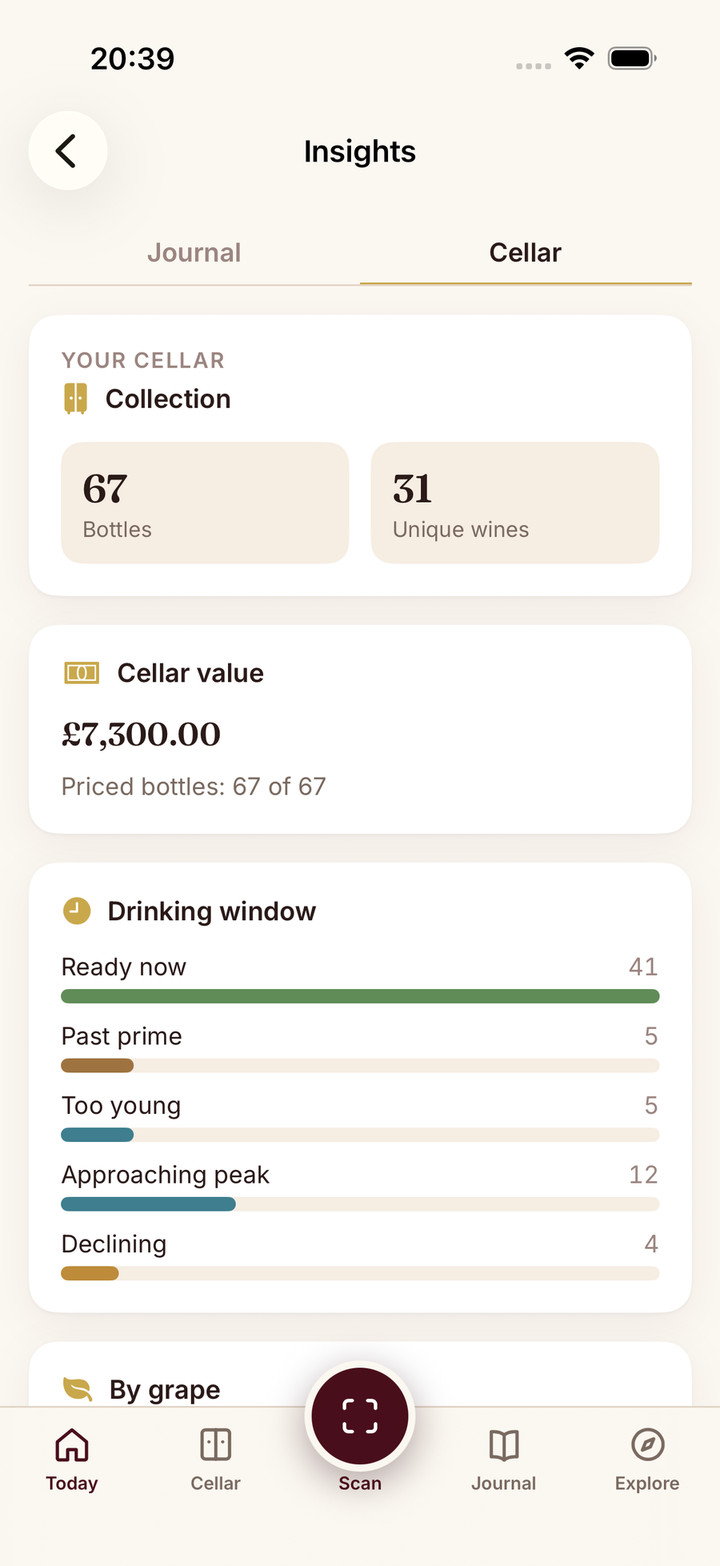
Sommo Insights dashboard showing the Cellar segment with drinking-window bars

Entity Insights on Every Grape and Region

Tap any grape or region chip from a scan result, the Insights dashboard, or an AI narrative, and Premium users see:

  • Your history — how often that grape or region appears in your journal and cellar
  • What we noticed — a short AI overview cached against your real touchpoints
  • Similar to try — knowledge-base suggestions to explore next

Free users see a clear upgrade path without losing access to the encyclopedia content underneath.
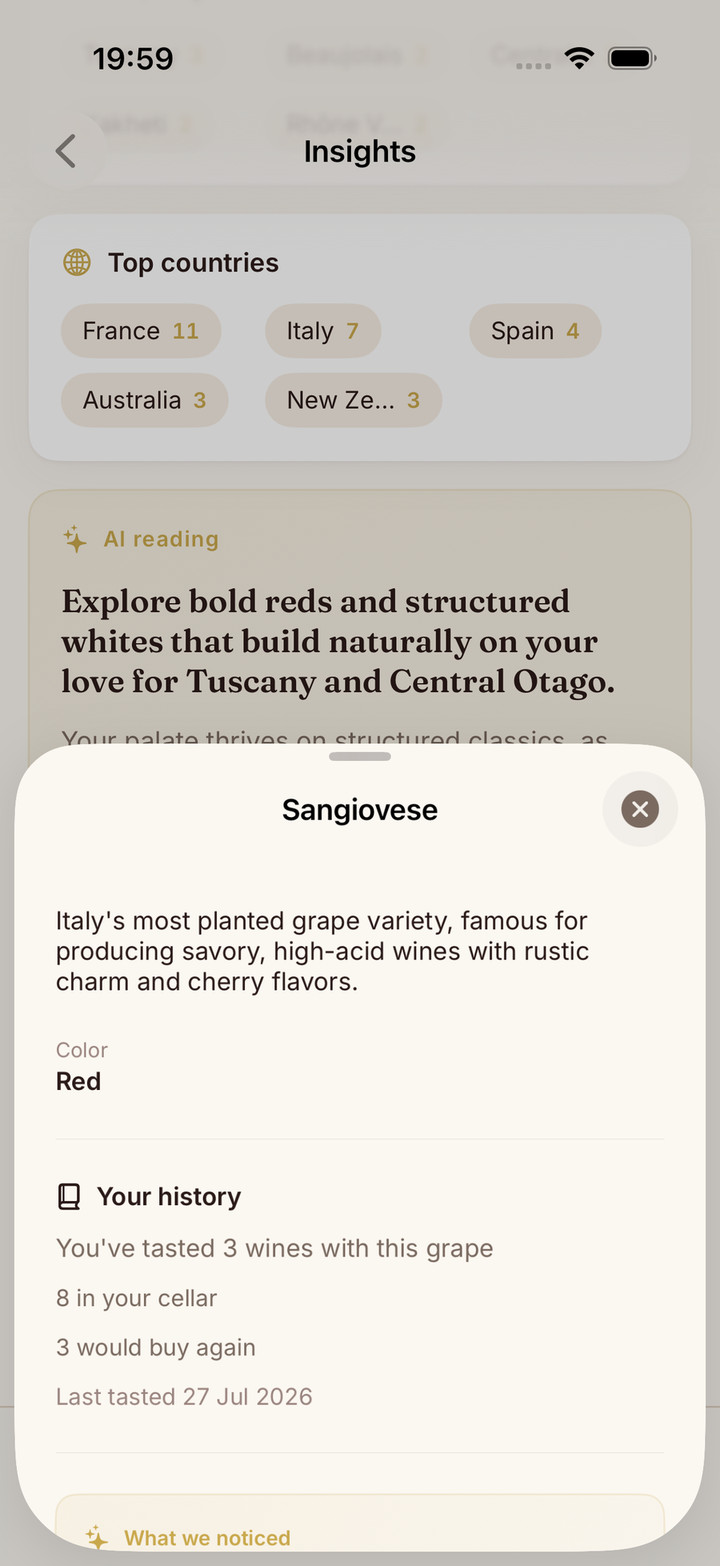
Sommo grape info sheet showing history stats and a What we noticed AI card

Go Deeper: Taste DNA and Wine Character

Insights links straight to Sommo’s personality surfaces:

  • Wine Character Analysis — your archetype and spirit animal from journal history (3+ entries)
  • Taste DNA — a shareable taste fingerprint and fun one-liners you can post

Insights steers what to try next. Character and Taste DNA explain who you are as a drinker. They complement each other rather than repeating the same prose.

Frequently asked.

01.
Where do I find Wine Insights?
+
Open Profile and tap Insights. You can also jump in from the Journal or Cellar tab via the See your insights card at the top of the list.
02.
Do I need both a journal and a cellar?
+
No. Insights works with either source. If you have journal entries and cellar bottles, a segment picker switches between Journal and Cellar views. Each segment has its own charts and AI write-up.
03.
Does the dashboard wait for AI before it loads?
+
No. Charts and stats paint immediately from your data. The AI narrative loads separately when you scroll to it, so the screen never sits on a full-page spinner.
04.
What about grape and region info sheets?
+
When you tap a grape or region anywhere in Sommo, Premium users see Your history plus a What we noticed AI card and similar suggestions, built from your journal and cellar touchpoints for that entity.
05.
Is Wine Insights included with Premium?
+
Yes. Wine Insights is a Premium feature. Free users still scan, journal (30-day retention), and explore the map before upgrading.
All features, one subscription

Try Wine Insights: Journal and Cellar Analytics with AI,
free.

Three-day free trial of Premium. No credit card up front. Cancel anytime.