The Wine Wall
Every rack rendered as a real wall: orbit it, pinch in until labels read, and drag a bottle to a new slot by hand. Depth lanes stack bottles nose to tail, the way a real cellar does.
Your cellar, standing up.
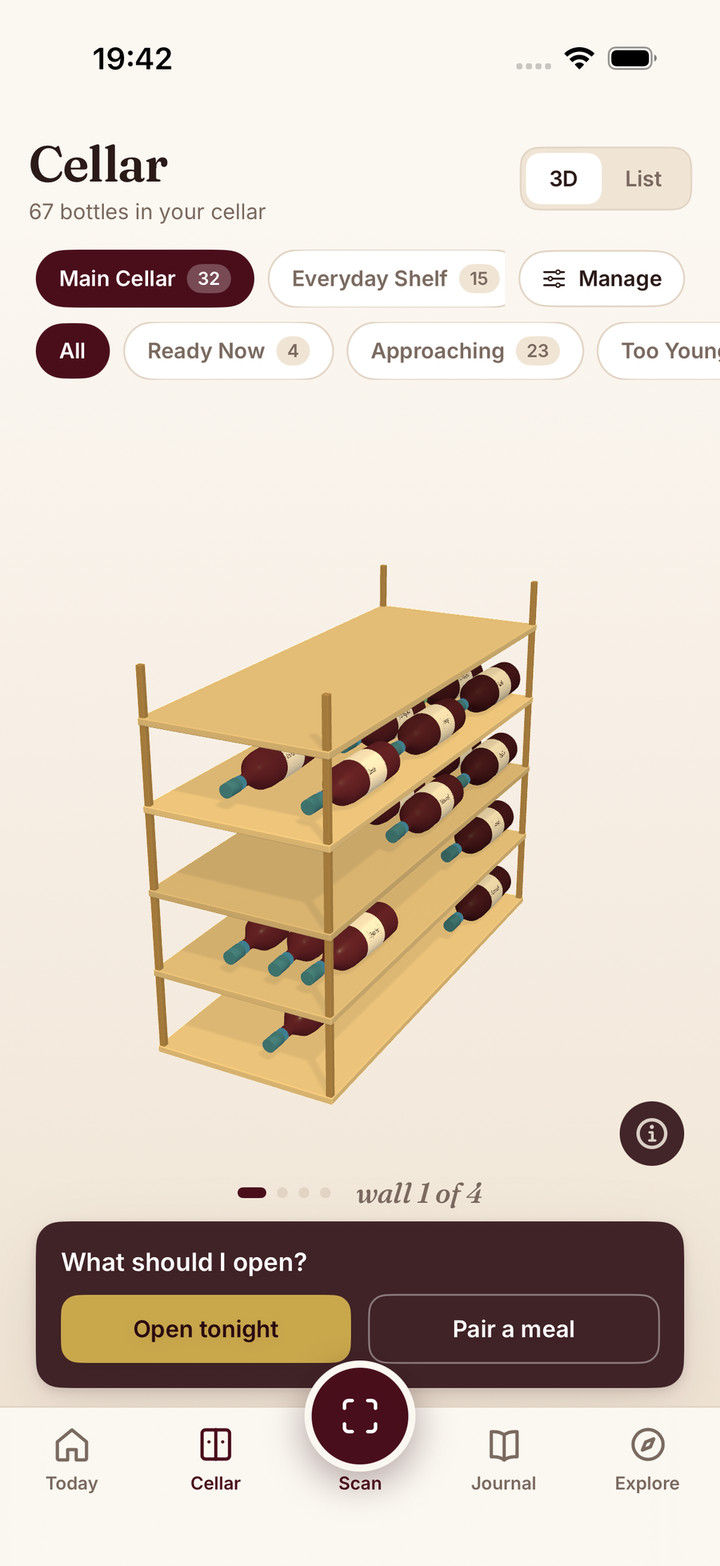
Every rack rendered as a real wall: orbit it, pinch in until labels read, and drag a bottle to a new slot by hand. Depth lanes stack bottles nose to tail, the way a real cellar does.
Glass takes the wine's colour, foil collars carry the drinking window, and a tappable legend explains every mark. Filter chips show live counts by type, country, and grape.
Describe tonight's dinner and get a pick from your own bottles, with the rack and slot so you know where to reach. If nothing truly fits, Sommo says so and suggests what to buy.
Send a rack by link and the recipient gets it copied into their own cellar, bottles and positions intact.
Scan a label or add from any wine page. Pick a rack, tap a slot, and the bottle takes its place, front lane or behind.
Describe your meal for AI pairing, or open the Today tab to see which bottles are most ready tonight.
Mark bottles opened, undo mistakes, rate into your journal, and let Sommo refine your windows.
You know that feeling of opening a bottle and thinking, “I should have saved this for a better occasion”? Or the opposite: cooking something special and realising you have no idea which bottle in your collection would actually pair well with it?
The wine cellar in Sommo solves both. It gives you a visual rack for what you own, AI that picks from your shelves instead of a textbook, and drinking-window logic so you open bottles while they still shine. If you are building a collection rather than flipping labels, see Sommo for wine collectors.
Most collectors don’t keep every bottle in one place. The everyday reds live in the kitchen, the special bottles age in the basement, the office fridge holds the whites that need to be cold by 6pm.
Sommo renders all of it as a wall you can actually look at:
Filter chips across the top show live counts by type, country, and grape, computed over the whole cellar, with a stats row you can tap to filter. For a wider look at how people set up storage at home, our first real wine cellar guide walks through the same split-kitchen-and-cellar logic.
A rack is also a thing you can give. Share one from its settings and send the link: whoever opens it gets the rack copied into their own cellar, bottles and grid positions intact, as a rack they own outright. The wedding stash you built for a friend, handed over as an object rather than a screenshot of a list.
Every wine in your cellar shows the full details from its original scan: producer, vintage, grape varieties, region, tasting notes, and your personal notes. You see quantities at a glance, so you know whether you have one precious bottle or a case to work through.
Adding wines is fast. Scan a label and Sommo offers a placement card: pick the rack, tap a slot in the grid, set quantity, optionally add a note like “Anniversary dinner” or “Gift from Marco.” Done. You can also add from Wine Tasting Mode when a flight wine earns a place on your shelf.
When you open a bottle, mark it as opened. The slot frees up. Changed your mind? Undo it.
The standout feature is AI food pairing. Tell Sommo what you’re eating and it looks at every bottle you own, across every rack, analyses the flavour profiles, and recommends the best match.
This isn’t a generic “red wine goes with steak” suggestion. The AI considers the specific wines in your collection. If you describe “grilled salmon with lemon butter,” it might recommend your Chablis over your Sauvignon Blanc based on the vintage and producer style. If you’re making a rich beef bourguignon, it’ll point you to the right Burgundy or Rhône bottle, and tell you which rack to grab it from. Browse more food and wine pairing guides on the site, then let Sommo narrow the answer to your shelves.
Pairing results are cached for 24 hours, so asking the same question twice doesn’t waste time.
Wine pairing is rarely a one-time decision. You plan a dinner over morning coffee, then come back to it at 6pm. The pairing sheet keeps your last 20 searches, with the meal description, the top pick, and a relative date. Tap any row to reopen the full result, re-enriched against the wines currently in your cellar (quantities, rack positions, anything you’ve consumed since).
Picking a wine is half the job. The other half is remembering what you drank.
Tap Add to Journal on any pairing pick and Sommo runs the full chain: opens the bottle, decrements the cellar, then surfaces the rate sheet so you can capture your impression while it’s fresh. One continuous flow from “what should I open” to a journal entry that feeds your Wine Character Analysis.
Every bottle gets a drinking-window estimate: not a single date, but the full too-young, ready, and past-its-peak curve, with the strength of the vintage folded in. The rack glyph is coloured by wine type with the outline tracking the window state: young, ready, declining. Tell Sommo how a bottle is stored, warm and swinging or cool and steady, and its window tightens to match. Rate the bottles you open and Sommo nudges future windows toward how wine actually tastes to you, showing the standard window and your taste side by side.
When a bottle moves into its peak, Sommo sends a push notification so a good wine doesn’t get forgotten in the back of the cellar. The Today tab opens on a bottle you already own that is ready to drink now, its window card opens the approaching-bottles list, and Open Tonight ranks the bottles most worth drinking by readiness. Tap the info button on any window for a plain-language guide to how the estimate is built. For the full method, see how drinking windows work and how Sommo estimates drinking windows.
Sommo’s cellar isn’t built for people who want to chase auction prices. It’s built for people who buy wine to drink it and want to drink it well. Compare how it stacks up in our best wine cellar apps roundup.
You scan a bottle at the shop. Sommo offers a rack and a slot. When the right moment comes, you ask the AI what to open, or you check Today. You open the bottle. You rate it. Simple.
Pair the cellar with your wine journal and you have a complete loop: buy, store, pair, drink, record. Every bottle gets the attention it deserves. And when the collection deserves a document, the cellar book typesets it.
Wine Insights reads the same cellar data back to you: bottle-weighted stats, drinking-window mix, top grapes and countries, and a cellar AI narrative that cross-references your journal taste where it helps.
Map a physical shelf first with the free wine rack planner, then bring real bottles, vintages and windows into Sommo.
Three-day free trial of Premium. No credit card up front. Cancel anytime.