Wine Cellar — Track Your Collection with AI Food Pairing
Track every bottle. Pair any meal.
Keep a digital inventory of every bottle you own. Track quantities, mark bottles as opened, and get AI-powered food pairing suggestions from your own collection.
Included with Premium subscription
What You Get
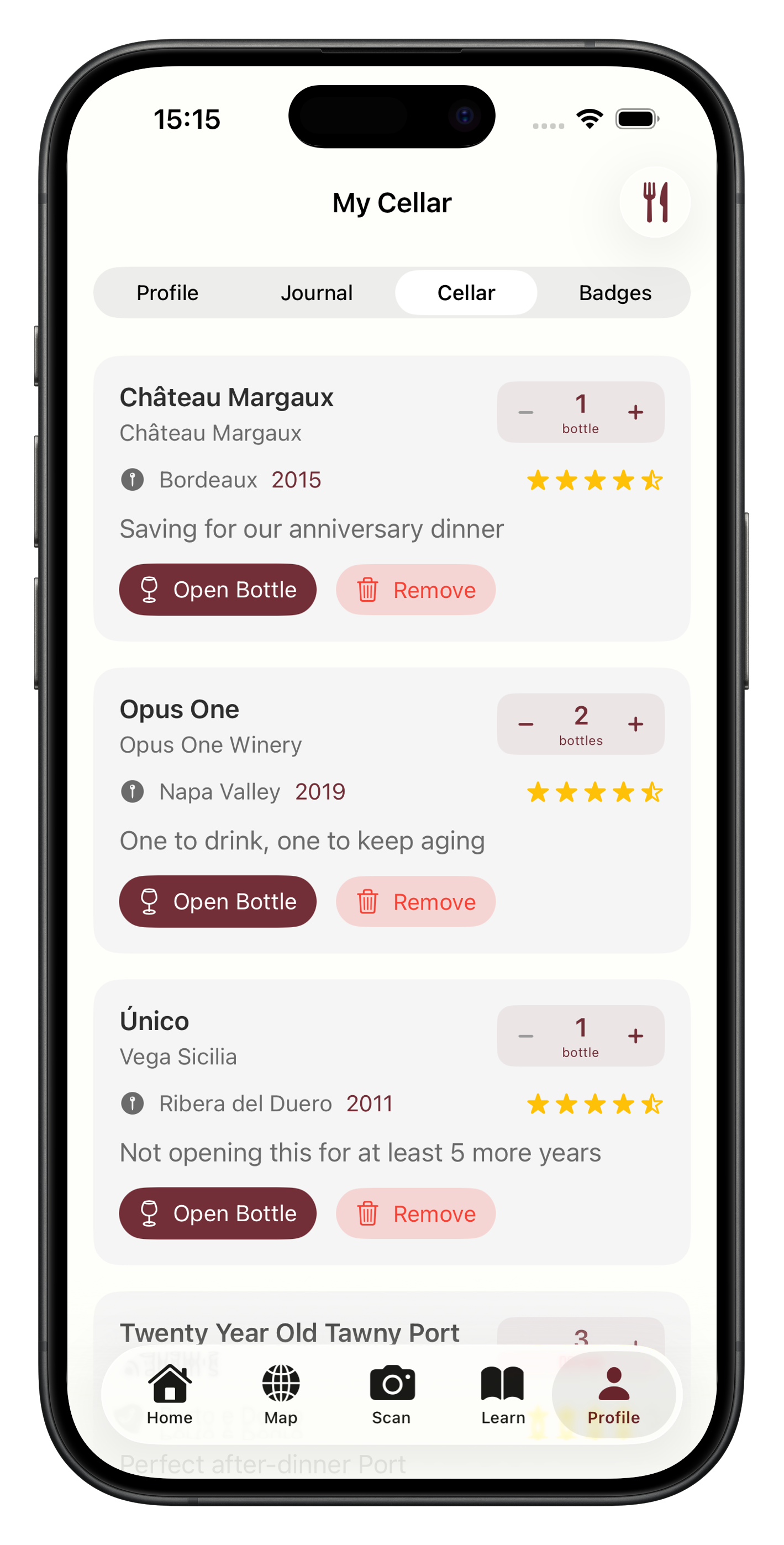
Collection at a Glance
See every bottle you own with quantities, notes, and quick access to full wine details.
AI Food Pairing
Describe what you're cooking and get personalised pairing suggestions from your own cellar.
Open & Track
Mark bottles as opened to keep your inventory accurate. Undo if you change your mind.
How It Works
Scan and add
Scan a wine label to add it to your cellar, or add directly from any wine detail page.
Describe your meal
Tell Sommo what you're cooking or ordering tonight.
Get your pairing
AI recommends the best bottle from your collection for the meal.
Your Bottles. Your Way.
You know that feeling of opening a bottle and thinking, “I should have saved this for a better occasion”? Or the opposite: cooking something special and realising you have no idea which bottle in your collection would actually pair well with it?
The wine cellar in Sommo solves both problems. It gives you a clear view of what you own and an AI that tells you what to open tonight.
A Collection You Can See
Every wine in your cellar shows the full details from its original scan: producer, vintage, grape varieties, region, tasting notes, and your personal notes. You see quantities at a glance, so you know whether you have one precious bottle or a case to work through.
Adding wines is fast. Scan a label and tap “Add to Cellar.” Set the quantity. Optionally add a note like “Anniversary dinner” or “Gift from Marco.” Done.
When you open a bottle, mark it as opened. The quantity updates. Changed your mind? Undo it.
AI That Knows Your Cellar
The standout feature is AI food pairing. Tell Sommo what you’re eating and it looks at every bottle you own, analyses the flavour profiles, and recommends the best match.
This isn’t a generic “red wine goes with steak” suggestion. The AI considers the specific wines in your collection. If you describe “grilled salmon with lemon butter,” it might recommend your Chablis over your Sauvignon Blanc based on the vintage and producer style. If you’re making a rich beef bourguignon, it’ll point you to the right Burgundy or Rhône bottle.
Pairing results are cached for 24 hours, so asking the same question twice doesn’t waste time.
For Collectors Who Drink
Sommo’s cellar isn’t built for people who want to track drinking windows and auction prices. It’s built for people who buy wine to drink it and want to drink it well.
You scan a bottle at the shop. You add it to your cellar. When the right moment comes, you ask Sommo what to open. Simple.
Pair the cellar with your wine journal and you have a complete loop: buy, store, pair, drink, record. Every bottle gets the attention it deserves.
Frequently Asked Questions
Scan a wine label to add it directly, or tap 'Add to Cellar' from any wine detail page. You can set the quantity and add personal notes like where you bought it or what you're saving it for.
Describe what you're cooking or ordering — 'lamb chops with rosemary' or 'spicy Thai curry' — and Sommo analyses your cellar to recommend the best bottle for the meal. Results are cached for 24 hours so repeat queries are instant.
Yes. If you mark a bottle as opened by mistake, you can undo it immediately. The bottle returns to your cellar inventory.
The wine cellar is a Premium feature. Free users can try Sommo's scanning, journal, and map features before upgrading.