You are at a tasting room with six glasses lined up in front of you. The flight card lists names, producers, and regions. You take a sip, form an opinion, move on to the next. By the end, you have already forgotten what the second one tasted like.
That gap between tasting and remembering is exactly what Wine Tasting Mode was built to close.
Why Traditional Wine Apps Fail at Tasting Events
Most wine apps are designed for a single bottle. You scan the label, read the details, write notes, rate it. That workflow makes sense at dinner. It does not make sense at a tasting event with three to twenty-five wines in front of you.
Sommo’s existing wine scanning and journal features are thorough. But at a busy tasting, you need speed during the event and depth after. Wine Tasting Mode delivers both.
How Wine Tasting Mode Works
Start a Tasting Session
Tap Wine Tasting from the Home or Scan tab. Give your session a name (the venue), a location, and optionally a theme like “Pinot Noir Vertical” or “Napa Valley Reds.”
Scan the Flight Card or Add Wines by Name
You have two ways to add wines:
- Scan the flight card. Take a photo of the tasting menu or flight card. Sommo’s AI reads it and adds every wine to your session automatically, including producer, region, and grape varieties.
- Add by name. Type a wine name and AI identifies it with full details.
No label scanning required. No squinting at bottles across the table.
Quick-Rate Every Wine in the Flight
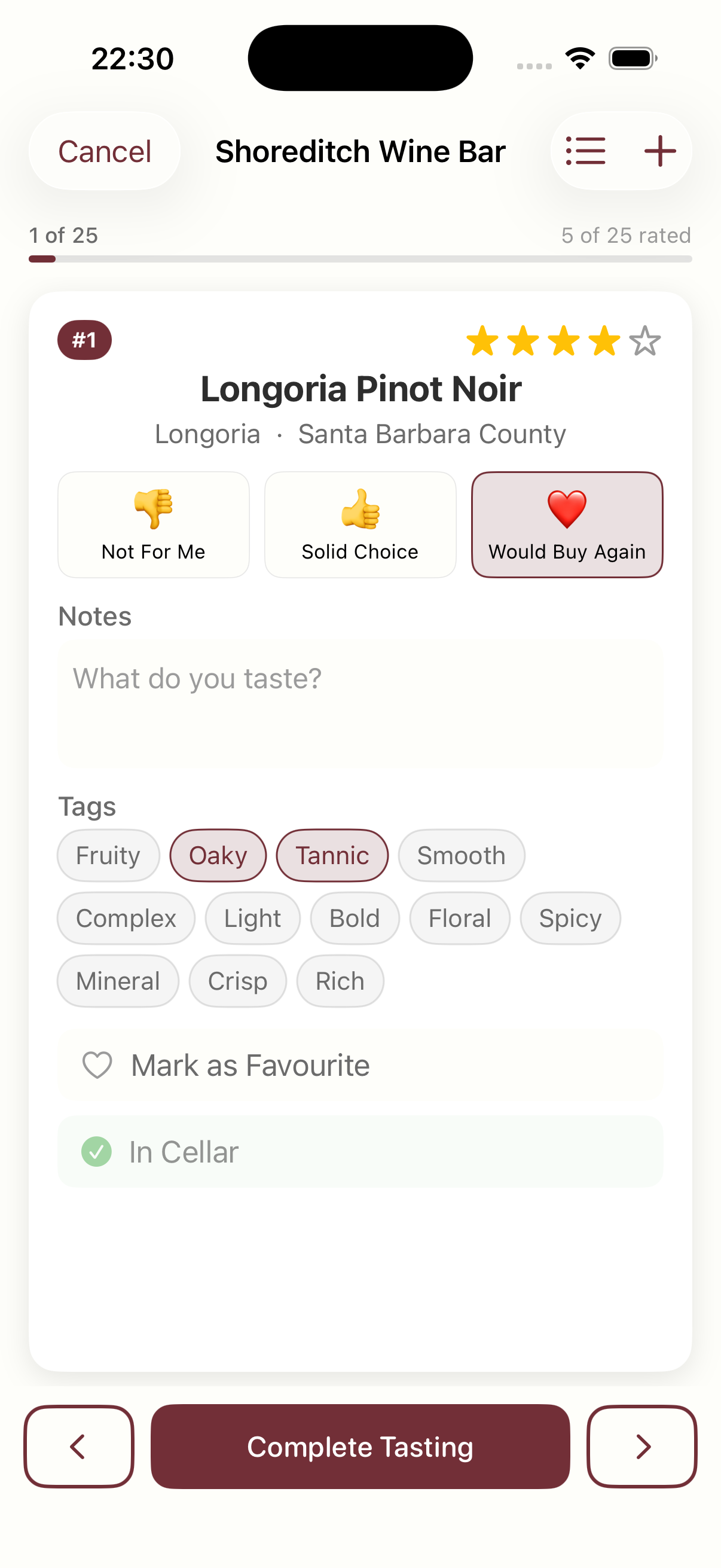
Swipe through your wines one at a time. For each wine, you get:
- One-tap rating. Not For Me, Solid Choice, or Would Buy Again.
- Tasting notes. A simple text field. “Dark fruit, long finish” is enough.
- Flavour tags. Tap Oaky, Tannic, Smooth, Bold, or any of twelve preset tags.
- Favourite toggle. Mark the standouts instantly.
- Add to Cellar. Save a bottle to your wine cellar right from the tasting card.
The whole interaction takes seconds per wine. Rate, note, tag, swipe, next.
Use List View for Larger Flights
With 25 wines in a flight, swiping one by one can be slow. Toggle to the list view to see every wine at a glance with its name, region, and rating status. Tap any wine to jump straight to its card.
Complete the Tasting Session
When you are done, tap Complete Tasting. Sommo creates a journal entry for every rated wine. Your ratings, notes, and tasting date all carry over. The wines also appear on your wine map as explored regions.
Everything flows into your existing journal. No separate silo, no duplicate data.
AI-Powered Wine Tasting Insights
After you complete a session, Sommo’s AI analyses your ratings, notes, and flavour tags automatically. No button to press. Insight generation starts as soon as you finish.
Personalised Palate Analysis
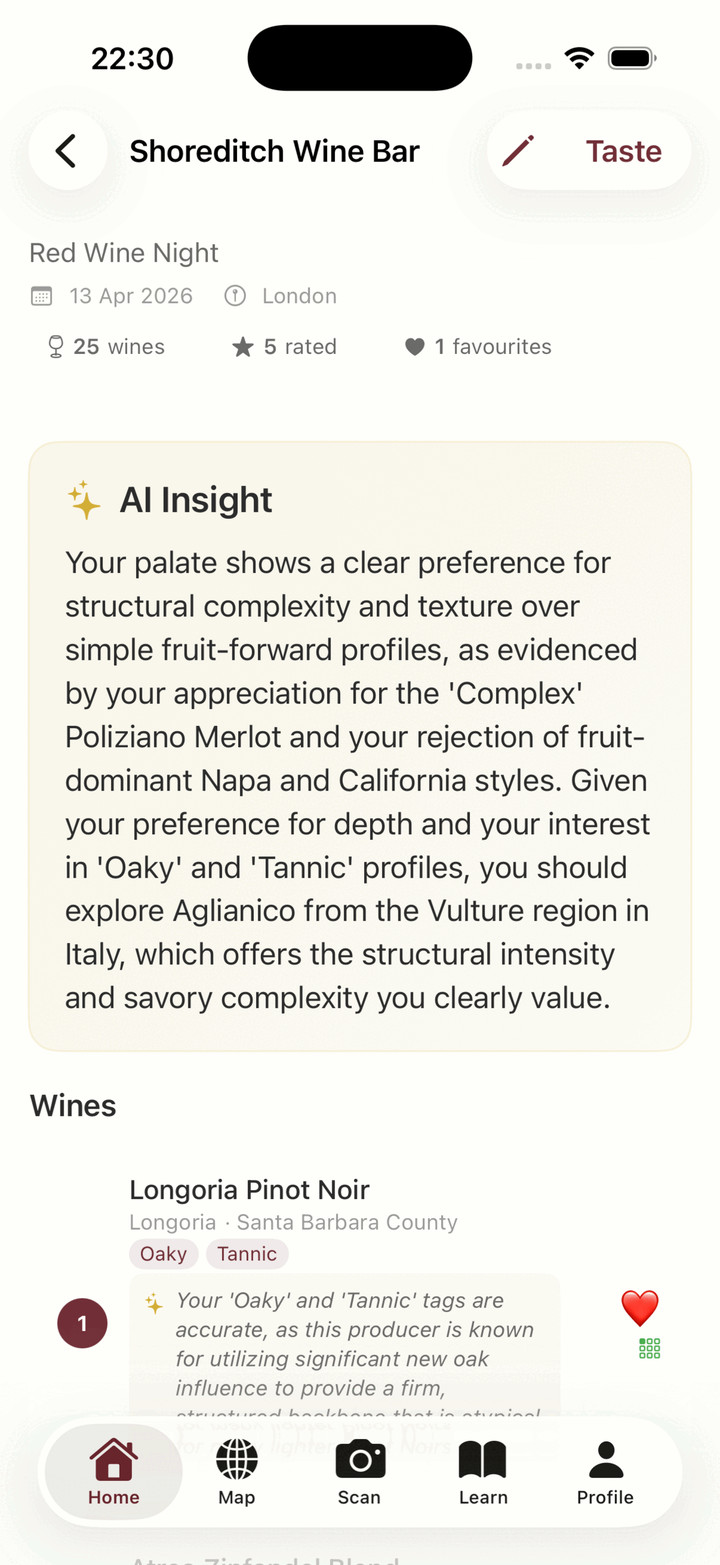
The AI identifies patterns across your rated wines. It connects what you enjoyed to specific flavour profiles and suggests new wines or regions to explore based on those patterns.
This is not generic advice. If you tagged three wines as “Oaky” and rated them all Would Buy Again, the AI notices and tells you exactly why. It also recommends specific wines and regions that match your demonstrated preferences.
Per-Wine Sommelier Reviews
Every rated wine gets its own one to two sentence review from the AI. These are not just agreement with your tags. The AI cross-references your tasting notes against how the wine actually tastes:
- Accurate tags get confirmed with evidence. “Your ‘Oaky’ tag is spot-on. This producer uses 18 months of new French oak.”
- Unlikely tags get a diplomatic correction. “You tagged this as ‘Light’, but Brunello is typically full-bodied. You may be picking up on the high acidity that gives an impression of lightness.”
- Contradictions get explained. If you tagged a wine as both Light and Bold, the AI explains what you might actually be tasting.
Every tasting becomes a micro-lesson in wine education. If you want to keep that muscle warm between events, the free blind tasting trainer runs the same exercise from your sofa.
Edit Tastings and Regenerate AI Insights
Changed your mind about a rating? Remembered a note you wanted to add? Tap Taste on any completed session to re-enter the quick-rating flow. Updates sync to your journal entries automatically.
You can also edit the session metadata: venue name, location, date, theme, and notes.
When you change a rating or note, the AI insight is automatically invalidated and regenerated the next time you view the session. Fresh data, fresh analysis.
What Wine Tasting Mode Creates
| Action | What happens |
|---|---|
| Rate a wine | Journal entry created on completion |
| Tag a wine | Tags stored on the tasting session wine |
| Mark as favourite | Visible in session detail |
| Add to cellar | Wine added to your cellar |
| Complete session | Journal entries, XP, and region exploration |
| View session | AI insight and per-wine reviews generated |
Who Is Wine Tasting Mode For?
Wine Tasting Mode works for anyone who tastes multiple wines at once:
- Winery visits where you taste through a flight of six to twelve wines
- Wine bar flights with three to five pours you want to remember
- Dinner parties where the host opens several bottles
- Wine courses and WSET tastings where structured note-taking matters
- Wine festivals with dozens of wines to try in limited time
If you have ever left a tasting wishing you had written something down, this feature is for you.
Available on Sommo Premium
Wine Tasting Mode is available to Sommo Premium subscribers. Free users can see the feature on the Home and Scan tabs but will be prompted to upgrade before starting a session.
Free users still get access to wine scanning, the wine journal, and the interactive wine map.
Try It at Your Next Wine Tasting
Whether it is a winery visit, a wine bar flight, or a dinner party with friends, Wine Tasting Mode turns every tasting into structured data you can learn from. Scan the card, rate the wines, and let AI tell you what your palate is really saying.
Ready to try it? Download Sommo and start your next tasting with AI by your side.