Consider Oeni when your recurring job is maintaining an owned cellar and deciding what to open. Consider Vivino when your recurring job is discovering wines through labels, community opinion and shopping. That is a difference in emphasis, not a hard dividing line: Vivino also documents cellar tools and drinking windows, while Oeni offers more than a stock count.
A useful comparison follows a bottle through your routine. What happens before you buy it, after you put it away and after you drink it? Choose the product whose relevant steps are useful on your actual plan, rather than assuming either one owns an entire category.
Where the documented features overlap
| Task | Oeni | Vivino |
|---|---|---|
| Maintain owned wine | Stock, ageing and 3D cellar positioning | Basic cellar; fuller collection tools under Premium |
| Explore a wine | Product information and cellar guidance | Community ratings, taste matching and marketplace |
| Choose with food in mind | Food-pairing and cellar guidance | Food pairings and Sommelier guidance, with plan differences |
| Work across devices | Current FAQ confirms web and cross-platform accounts | Guide describes Premium desktop cellar access |
| Prepare a move elsewhere | Excel import and insurance PDF export documented | Verify the current consumer export process and fields |
Official sources were checked on 5 October 2026: Oeni’s product FAQ, its import guide and Vivino’s May 2026 feature guide. We have not conducted a hands-on test of entry speed, recognition accuracy or recommendation quality.
Before buying: use the result as a starting point
Vivino’s community ratings and taste matching are relevant when you are choosing an unfamiliar bottle. They give you reasons to investigate, rather than a guarantee of enjoyment. Check the matched producer, vintage and size before comparing a rating or price with the bottle in front of you.
A popular average can hide differences between vintages and preferences. Read what people noticed, then ask whether those descriptions fit the occasion. Your own notes from a similar wine may be more useful than a small difference in score.
If the matched label or vintage is wrong, follow the scan-correction checklist before saving it. A plausible rating for a different bottle is still the wrong record.
If buying is the main task, you do not necessarily need to move your cellar records. A discovery app can remain a reference beside the system you trust for stock. Keep the decision about a purchase separate from the decision about where every bottle will be recorded.
After buying: establish the real inventory
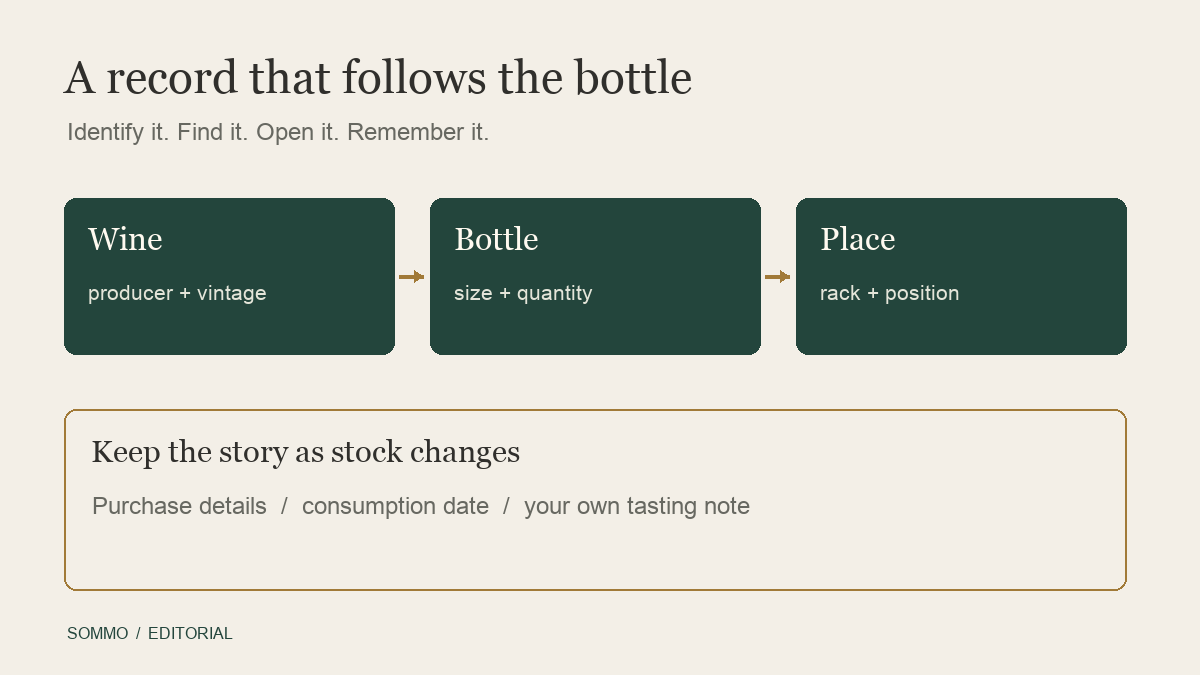
An owned collection needs more detail than a list of wines you recognise. Record how many bottles arrived, their sizes and where they went. Decide how you will handle a second purchase of the same vintage at a different price. That becomes important when you open one bottle or try to reconstruct a purchase later.
Oeni positions its workflow around stock, ageing and a 3D cellar. Vivino’s guide describes quantities and vintages in its cellar tracker, with fuller tools under Premium. Neither description replaces checking the workflow available in your own account.
Use a simple location convention before adding complexity. Two racks called “main” will be confusing even in a detailed visual model. The wine rack planner can help decide whether you need shelf labels, exact positions or a fuller representation of storage.
A five-bottle example to try yourself
Imagine two bottles of a red from one vintage, one bottle of the following vintage and two whites. One red is intended for a later occasion, while a white is already chilled for dinner. This is a synthetic collection, not an example taken from either app.
Ask the product you are evaluating to support this sequence:
- Enter the five bottles and verify both red vintages.
- Identify which white is ready in the kitchen without changing the other one’s location.
- Find an owned-bottle suggestion for your meal and inspect its explanation.
- Open the chilled white, reduce its stock and save your own observation.
- A week later, retrieve that observation and distinguish it from the unopened white.
You may discover that your existing tool is enough. You may want a separate discovery app but a single stock record. The useful outcome is a routine you can maintain, not a new account full of unresolved entries.
Choosing tonight’s bottle involves judgement
Oeni’s cellar and pairing emphasis may appeal when you want to choose from wine already at home. Vivino’s current guide also describes food pairings, Premium drinking windows and its Sommelier assistant. Do not compare them as if Vivino offered no guidance beyond a crowd score.
For either product, make the question specific. Describe the food, your preferences and any bottle you want to save. Check whether the suggestion is available in your actual stock. If the answer relies on a drinking window, treat that as guidance rather than certainty about an individual bottle’s condition.
Keep a note of what you chose and how it worked. Over time, your own experience can tell you which recommendations are useful to you. We cannot infer that from a feature list or one successful label match.
Check the paywall for the job you need
Oeni advertises freemium access and a 30-day Plus trial. The precise ongoing free-versus-Plus matrix and current UK or US offer need checking in the app. Public store pages list several subscription products, so the lowest label is not necessarily the offer available to you.
Vivino’s current guide puts wine-list scanning and fuller cellar tools in Premium, while its general app page describes listed scanning and tracking features as free. The exact free cellar allowance is not established by those pages. Verify the relevant feature, billing period and currency in your own account rather than filling the gap with an old review.
Compare the recurring cost with the recurring benefit. If you only need to remember an occasional wine, an elaborate collection subscription may be unnecessary. If a paid tool prevents regular stock confusion, it may be valuable even for a smaller collection.
Back up before you consider moving
Oeni’s export help documents an insurance PDF. Its store release notes describe location in exports and a redesigned web version. This is evidence that export and web access exist, but not proof of a complete spreadsheet export suitable for migration.
For Vivino, confirm how you can export your own cellar and which fields appear today. Another product’s import instructions are not sufficient proof that your notes, photos and histories will all transfer. Keep an untouched backup and inspect a small sample before deleting or abandoning the source records.
Stay with the app that makes your repeated task dependable. Keep both if discovery and inventory have distinct roles, but nominate one source of truth for quantities. For a broader stay-or-switch checklist, see Oeni alternatives.
If your missing task is a personal tasting record, you can try one saved wine in Sommo. Free journal-history access covers 30 days; access to older journal entries, cellar inventory and cellar pairing require Premium. Start with that small action and judge its usefulness before considering a collection move.
Where does your wine routine need the most help?