Best Wine Scanner Apps 2026: AI Label Scanning Tested and Compared
We tested the top wine scanner apps of 2026 side by side. Here's which is fastest, most accurate, and actually helps you learn about the wines you scan.
You’re standing in a wine shop in front of a wall of bottles. One has a gorgeous label, French text you can’t quite read, and a price tag that could either be a steal or a mistake. You pull out your phone and scan it. In seconds, you know the grape, the region, the flavour profile, and what to eat with it tonight.
That’s the promise of wine scanner apps. But which one actually delivers?
I tested the five most popular wine scanning options of 2026 on dozens of bottles, from well-known Cabernet Sauvignons to obscure Georgian qvevri wines with hand-lettered labels. I scanned in shops, at dinner tables, and at home pulling bottles from my own rack. Here’s what I found.
What Makes a Great Wine Scanner?
Not all scanners are created equal. Before diving into the apps, here’s what I was evaluating:
- Accuracy: Does it correctly identify the wine, even with unusual labels or foreign text?
- Speed: How quickly do you get results? Anything over five seconds feels slow when you’re browsing a shelf.
- Depth of information: A name and a rating aren’t enough. I want to know what the wine tastes like, where it comes from, and what food to pair it with.
- What happens after the scan: This is the big one. Can you save the wine? Learn from it? Track it? Or does the experience end the moment you close the results screen?
With those criteria in mind, let’s get into it.
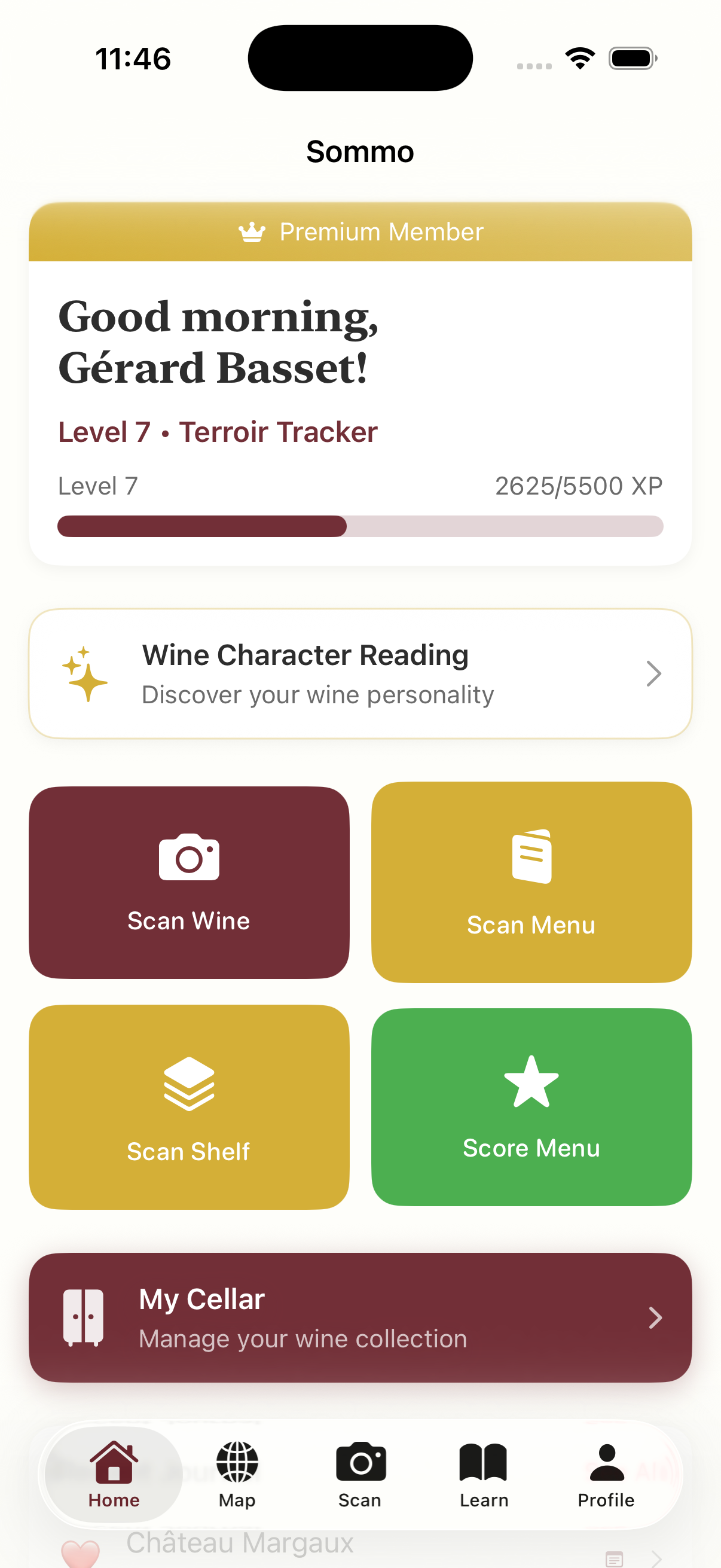
1. Sommo — Best Overall Wine Scanner
Sommo takes a fundamentally different approach to wine scanning. Instead of matching your photo against a crowdsourced database, it uses AI to analyse the label directly. That means it works on virtually any bottle, including wines with tiny production runs, foreign-language labels, and even hand-written text.
Point your camera at a label and within a few seconds you get the wine’s name, producer, region, vintage, grape variety, expected flavour profile, food pairings, and serving temperature. It’s not just identification. It’s a mini education about every bottle you encounter.
What really sets Sommo apart is what happens after the scan. You can save the wine to your wine cellar for tracking, add it to your journal with personal tasting notes, or request AI-generated food pairing suggestions for whatever you’re cooking tonight. Every scan feeds into your wine profile, and after enough entries, the app generates a character analysis revealing patterns in your palate.
Sommo also does something no other app on this list offers: it scans wine menus and shelves, not just individual labels. Point it at a restaurant wine list and get scores and recommendations for every wine on the page.
Strengths:
- AI-powered analysis works on labels from any country or region
- Rich, educational results (flavour profile, food pairings, serving temperature, regional context)
- Scans wine menus and shelves, not just bottles
- Scanned wines integrate with cellar, journal, and AI food pairing
- Genuinely teaches you about wine through learning modules, WSET exam prep, and structured tasting notes
- Clean, ad-free experience
Weaknesses:
- Free tier limited to 5 lifetime scans (Premium required for unlimited)
- iOS only (no Android app yet)
- No community ratings or social features
Price: Free (5 scans); Premium for unlimited scanning and full feature access
Verdict: If you want a scanner that not only identifies wines but helps you understand and remember them, Sommo is the clear winner. It’s the only app here that treats scanning as the start of a learning journey, not the end of one.
2. Vivino — Best for Crowd-Sourced Ratings
Vivino is the biggest name in wine apps, with over 60 million users and arguably the largest wine database in the world. Its scanner works by matching your label photo against this massive catalogue, and for popular wines, it’s fast and reliable.
The strength of Vivino is its community. Every wine has an average rating from thousands (sometimes millions) of users, plus individual reviews. If you want to know what the crowd thinks before you buy, Vivino delivers.
The weakness is what it doesn’t do. Scan a bottle and you get a rating, a price range, and some reviews. You don’t get a flavour profile. You don’t learn about the grape or region. And the experience is heavily weighted towards purchasing, with merchant partnerships and ads influencing what you see. For a deeper look at how Vivino compares, see our Vivino alternative breakdown.
Strengths:
- Massive database with excellent recognition for popular wines
- Community ratings from millions of users
- Price comparisons and purchase links
- Available on both iOS and Android
Weaknesses:
- Scanner relies on database matching, not AI analysis, so obscure wines often return no results
- No educational content or learning features
- Ad-heavy experience, with merchant-influenced recommendations
- Doesn’t teach you anything about what you’re scanning
Price: Free with ads; Vivino Premium removes ads and adds advanced features
Verdict: Vivino is the safe, familiar choice. If you mainly want a quick crowd rating before buying a well-known bottle, it does the job. But if you want to actually learn about what you’re drinking, you’ll need to look elsewhere.
3. CellarTracker — Best for Cellar Management
CellarTracker has been a staple for serious wine collectors since 2003. It has over 13 million community tasting notes and a robust inventory management system. The scanner, however, is not its strong suit.
The app’s primary value is tracking what’s in your cellar: purchase dates, drinking windows, storage locations. If you have hundreds of bottles and need to manage them, CellarTracker is thorough. But the scanning experience feels like an afterthought. Recognition is inconsistent, especially for lesser-known producers, and the results are sparse compared to AI-powered alternatives. For a fuller comparison, see our CellarTracker alternative page.
Strengths:
- Excellent cellar inventory and management features
- Large database of community tasting notes
- Detailed drinking window suggestions for ageable wines
- Available on iOS and Android
Weaknesses:
- Scanner accuracy is inconsistent, particularly for smaller producers
- Interface feels dated compared to newer apps
- No AI analysis or structured educational content
- Primarily built for collectors, not casual wine drinkers
Price: Free for basic use; voluntary contribution model
Verdict: If you’re a collector with a serious cellar, CellarTracker is worth having for inventory management. As a wine scanner, it lags behind the competition.
4. Delectable — Best for Wine Industry Community
Delectable positions itself as a wine social network, and it has built a following among wine professionals, sommeliers, and serious enthusiasts. The scanner uses OCR and database matching to identify bottles, and it works reasonably well for wines in its catalogue.
The community aspect is genuinely appealing. You can follow winemakers, sommeliers, and critics, and their notes tend to be more detailed and informed than what you’ll find on a mass-market platform. But the database is significantly smaller than Vivino’s, and the scanner struggles with wines outside the mainstream.
Strengths:
- Strong community of wine professionals and sommeliers
- Higher-quality tasting notes than most crowd-sourced platforms
- Clean, visually appealing interface
- Good for discovering wines through trusted palates
Weaknesses:
- Smaller database means less reliable scanning
- Limited learning features beyond community notes
- Fewer users means less coverage of everyday wines
- Development has slowed in recent years
Price: Free
Verdict: Delectable is a nice companion if you enjoy the social side of wine and want to follow professionals. As a scanner, it’s functional but not best-in-class.
5. Google Lens — Best Free Fallback
Google Lens isn’t a wine app. It’s a general-purpose visual search tool built into the Google app on both Android and iOS. But it can scan wine labels, and because it’s free and already on your phone, it deserves a mention.
Point Google Lens at a wine label and it will pull up web search results, shopping links, and sometimes a knowledge panel with basic information. For a well-known Bordeaux or a popular supermarket bottle, this can be surprisingly useful.
The problem is that there’s no structure to the results. You don’t get a flavour profile, tasting notes, or food pairings. There’s no journal, no cellar, no learning. It’s the equivalent of Googling the wine manually, just faster.
Strengths:
- Completely free, no app to install
- Available on both Android and iOS
- Works for well-known wines as a quick identifier
- Useful as a backup when other apps fail
Weaknesses:
- No structured wine data (just web search results)
- No journaling, cellar tracking, or learning features
- Results vary wildly in quality and relevance
- Not a wine app, just a search tool
Price: Free
Verdict: Google Lens is a handy fallback, not a wine companion. Use it when you don’t have a dedicated app installed, but don’t rely on it as your primary scanner.
How They Compare
| Feature | Sommo | Vivino | CellarTracker | Delectable | Google Lens |
|---|---|---|---|---|---|
| AI-powered analysis | Yes | No | No | No | Partial |
| Flavour profile | Yes | No | Community notes | Community notes | No |
| Food pairings | AI-generated | No | No | No | No |
| Menu/shelf scanning | Yes | No | No | No | No |
| Cellar tracking | Yes | Basic | Excellent | Basic | No |
| Learning features | Yes (WSET, modules) | No | No | No | No |
| Tasting journal | Yes | Basic | Yes | Yes | No |
| Community ratings | No | Yes (60M+) | Yes | Yes | No |
| Price | Free / Premium | Free / Premium | Free | Free | Free |
The Bottom Line
If you just want to check a rating before buying a bottle at the supermarket, Vivino will do the job. If you’re a collector with hundreds of bottles, CellarTracker’s inventory tools are hard to beat.
But if you want a wine scanner that actually makes you better at wine, one that teaches you about regions, grapes, and flavour profiles every time you scan, Sommo is in a category of its own. The AI-powered analysis, menu scanning, structured tasting notes, and integrated WSET exam prep turn every bottle into a learning opportunity.
I started this comparison expecting the apps with the biggest databases to win. Instead, I found that the smartest scanner isn’t the one that knows the most wines. It’s the one that teaches you the most about each wine it finds.
Try Sommo free and see the difference for yourself.
Photo by Deliberate Directions on Unsplash