What is the best wine app in 2026?
There is no single winner for every job. Vivino is strongest for crowd ratings, CellarTracker for inventory depth, Wine-Searcher for finding a bottle, and Sommo for connecting scanning, cellar, journal, pairings, personal insights, sharing and wine knowledge across iPhone, Android and the web.
The wine app you pick in 2026 says less about your phone than it used to. The real question is whether you want a specialist for one moment or a home for your whole wine life: the bottles you scan, own, open, remember, share and want to understand. That is a higher bar than a big database and a star rating.
Full disclosure: I build Sommo. This is a comparison by task, using official product descriptions checked on 5 October 2026. Those descriptions establish available features; they do not establish which app recognises your bottles fastest. Use the checks below to test the workflow that matters to you.
Choose the App by the Job
Start with the moment that keeps sending you back to your phone. A specialist can be the right answer when one job matters more than everything around it.
| Your main job | Start with | Why |
|---|---|---|
| Check crowd opinion before buying | Vivino | Community ratings alongside shopping tools |
| Organise a serious collection | CellarTracker | Deep inventory, valuations and collector history |
| Find a particular bottle or merchant | Wine-Searcher | Purpose-built price and availability search |
| Follow professional tasting notes | Delectable | A feed shaped around trade voices rather than crowd averages |
| Connect scanning, cellar, journal and learning | Sommo | One private record across the bottle’s whole journey |
If your immediate choice is narrower, the cellar app versus spreadsheet guide explains when software genuinely earns the switch. For tasting records, the wine journal app guide compares quick logs, structured notes and export.
The 5 picks at a glance
| App | Best at | Price | Platforms |
|---|---|---|---|
| Sommo | Your whole wine life in one connected app | Free tier; Premium at $4.99/month or $29.99/year | iPhone, iPad, Android, web |
| Vivino | Crowd ratings and price checks in the aisle | Free with ads; paid Premium tier | iOS, Android, web |
| CellarTracker | Cellar inventory, valuations, drink windows | Free tier; paid subscription | Web, iOS, Android |
| Wine-Searcher | Finding a specific bottle at the best price | Free; Pro subscription | Web, iOS, Android |
| Delectable | Following sommeliers and wine professionals | Free; Premium listed on iPhone | Listed for iPhone and Android; check compatibility |
Before choosing a free wine app, try one familiar bottle. Scan or enter it, save your own reaction, then find it again. Check which parts need payment: inventory, older journal history, restaurant-list tools and merchant results solve different problems. For a tasting record, compare the wine journal apps; for bottles on your rack, see the best app to track your wine cellar.
Try one bottle before choosing
If you want to remember what you liked, test that whole journey with one wine you have tasted. You can do this in Sommo’s browser app before installing anything.
- Open Scan and sign in or create an account. Complete the account setup if prompted, then continue to Scan. Have a bottle or a clear label photo ready.
- Scan the label or choose Add by name. Check the producer, wine and vintage against your bottle before accepting the match. The free tier includes five lifetime scans; check the balance shown in Scan before starting. Saving a wine through Add by name uses the same allowance.
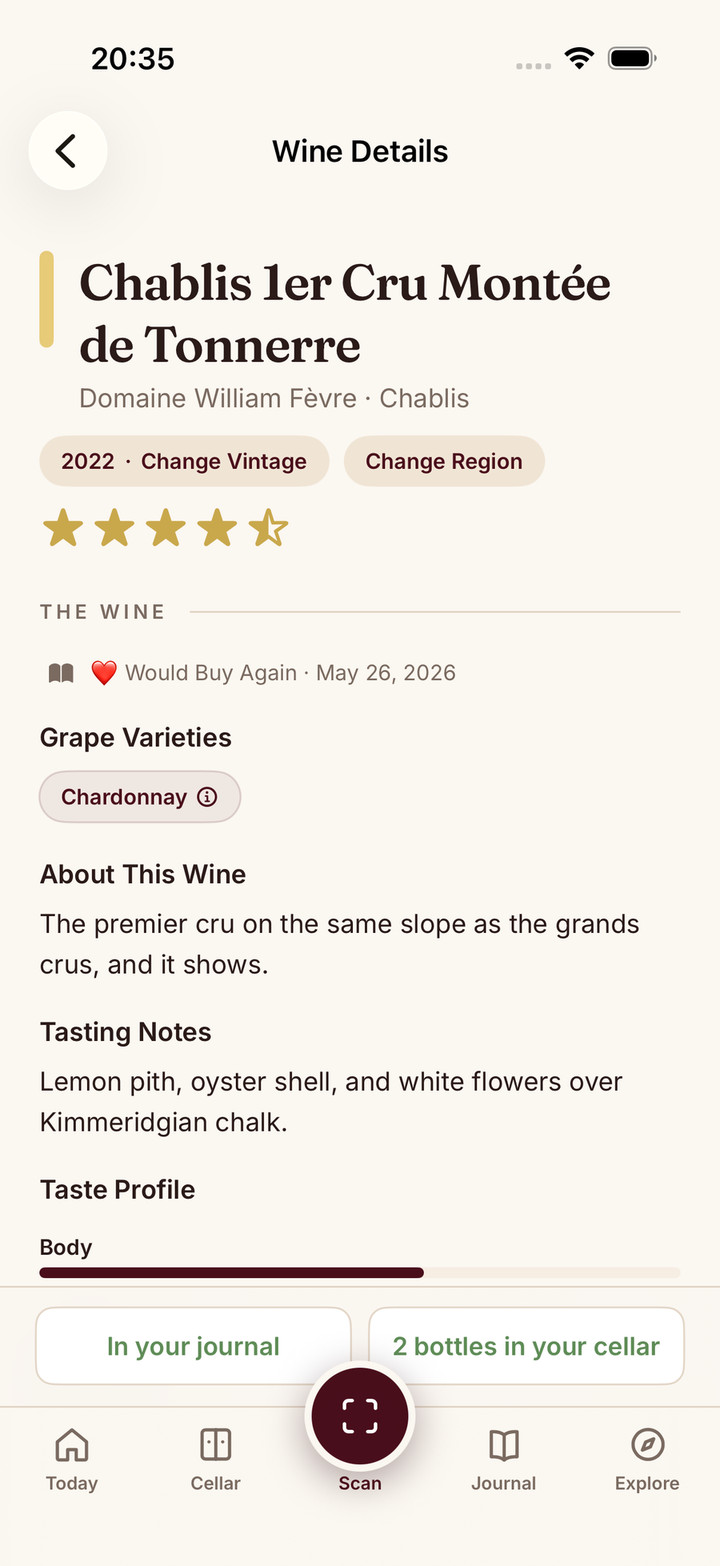
- Choose Taste again on the browser wine page. This action starts your first tasting as well as a repeat tasting. Write your own reaction, then choose Save to journal. Open Journal and find the entry again. A recognised label is a starting point; the saved, retrievable tasting is the useful result.
Open Scan in the web app to start this one-bottle test. You will need an account; the free journal shows the last 30 days. Older entries remain stored, with Premium needed to view them. Premium also adds cellar features. See current plan limits before moving a collection.
Prefer your phone’s app? Download Sommo, then open Scan to start with the same bottle. Button labels can differ from this browser walkthrough, and you may need to open Scan yourself after installation.
What makes a wine app worth keeping in 2026
The old checklist was database size and social feeds. The one that matters now is different:
- Runs everywhere, natively. One account that follows you from an iPhone at dinner to an Android tablet on the sofa, built for each platform rather than a website in a shell.
- AI that understands wine. Not a general chatbot bolted onto a scanner, but a model that knows structure, region, and food, and admits when it is unsure.
- Learns your palate, not the crowd’s. A 3.8 average tells you what strangers thought. A good app tells you what you will think.
- Connects the bottle’s whole life. The scan should be able to become a cellar position, dinner pairing, journal entry, palate signal or shared tasting without starting over.
- Honest, predictable pricing. A price you can read off the page, with no pressure to buy bottles you did not come for.
- Respects your data and attention. Clear privacy choices, usable export and no surprise loss of your own notes.
Use those criteria to choose among the five options.
1. Sommo: best all-round wine app
Sommo is the option I built for connecting those jobs. Its strengths and limits follow from that choice.
Sommo is native on iPhone, iPad, and Android, with a web app alongside. The Android version is a true port, written the way the iOS app is written for iOS, so it is the whole app rather than a cut-down edition. Your journal, cellar, progress, and subscription sync across every device.
Underneath sits a wine-specific AI system grounded in structured wine data. The same intelligence supports scanning, pairing, tasting feedback and palate analysis, with explicit limits published on Under the Hood instead of pretending every answer is certain.
The app learns your palate. Your ratings and tasting notes build a Taste DNA profile and an AI character analysis, weighted so recent bottles count more than old ones. Your notes power your own profile only. They are never sold or used to train a model other people rely on.
What you get in one place:
- AI label scanning with tasting profile, region, grapes, and a drinking window. See the scanning guide.
- A tasting journal with structured SAT notes and AI feedback on your palate.
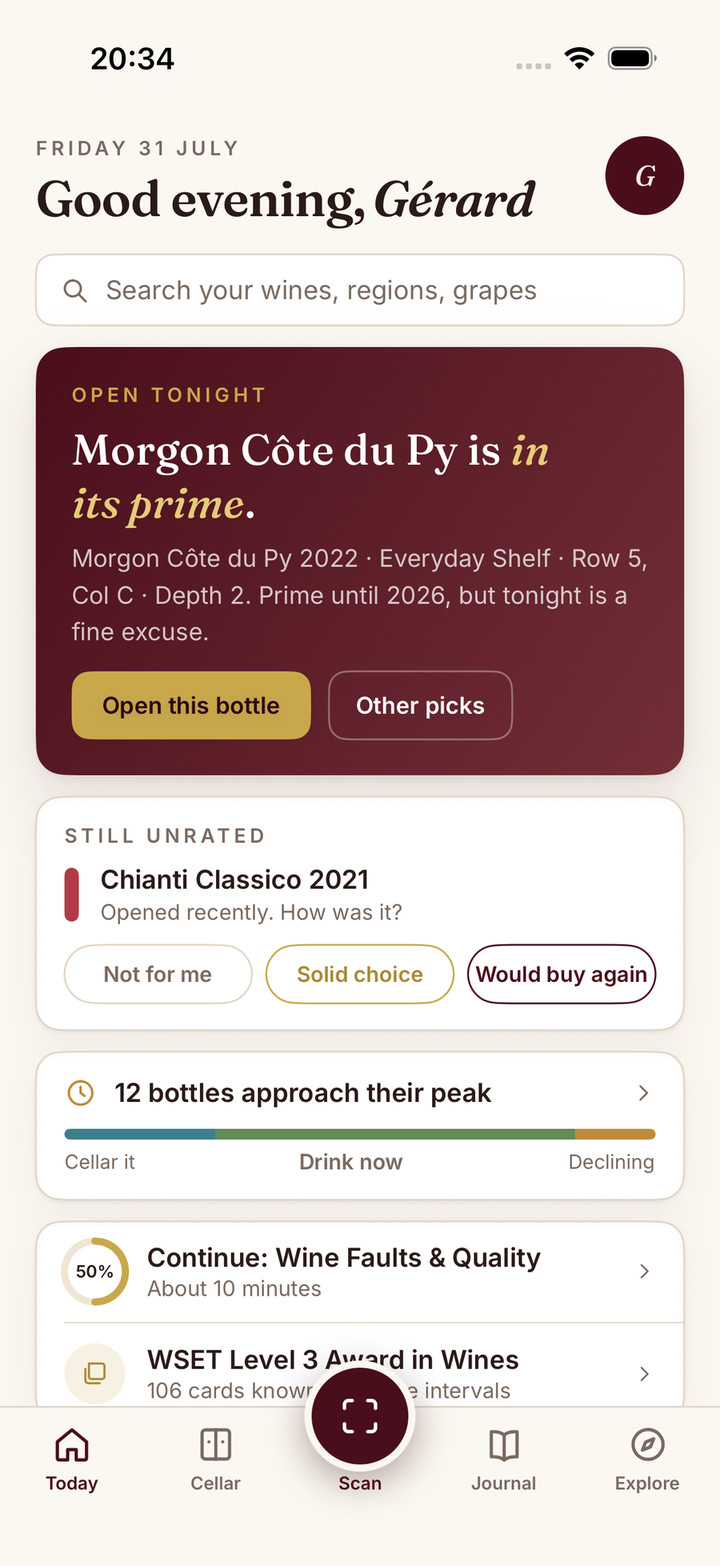
- A smart cellar with multi-rack inventory, drinking windows, AI food pairing from bottles you own, and an Open Tonight pick.
- Tasting mode for flights, with AI session insights and per-wine reviews.
- Sharing Party and Mix Palate for blind group tastings, palate comparisons, shared racks and designed share cards.
- Menu scoring that reads a restaurant list and flags the smart buys.
- An atlas of 1,000+ regions, and full WSET Level 1 to 4 prep with AI-graded typed answers.
- Ten languages, interface and AI writing alike.
Pricing: the free tier includes five lifetime scans, the fundamentals module, a 30-day journal, full map access and WSET fundamentals. Premium’s US list price is $4.99 a month or $29.99 a year, with a free trial on monthly (and yearly on iPhone and web). Check your store for the local price and trial terms. There are no ads on either tier. If family access matters, check whether the subscription offered in your store is eligible before buying. Google Play Family Library does not share in-app purchases, including subscriptions.
Weaknesses, honestly: the community is smaller than Vivino’s because Sommo is newer, and it is private and invitation-led rather than a public rating feed. There is no bottle shop or merchant price comparison by design, so this is not the app for one-tap buying.
Verdict: if you want one beautifully designed app that scans, cellars, pairs, remembers, shares and grows with you on whatever device is in your hand, this is the one I built for exactly that.
2. Vivino: best for crowd ratings and buying
Vivino centres its experience on a large community of wine ratings and a marketplace. Scan a label to look up crowd opinion, tasting notes, prices and food suggestions. Its official feature guide also describes personal recommendations and a cellar, with fuller cellar and learning tools in Premium.
Strengths: label recognition, community ratings, price comparisons and a built-in shop.
Weaknesses: the free tier is ad-supported, and the marketplace is central to the experience. Crowd scores flatten to an average that hides whether you will like a wine, while the fuller cellar, drinking-window and wine-list tools sit in Premium. It can feel overwhelming for beginners.
Price: free with ads; Vivino Premium removes them.
Verdict: start here when crowd opinion and buying are your main jobs. Compare the paid tools if cellar management, wine-list scanning or guided learning also matter.
3. CellarTracker: best for serious, large cellars
CellarTracker focuses on the collector record: bottles, storage locations, consumption and community tasting notes. Its subscription guide distinguishes free inventory from paid valuations, enhanced drinking windows and CellarChat.
Strengths: exhaustive cellar management, market valuations for investment tracking, and detailed drink window recommendations for a large collection.
Weaknesses: the deepest workflows still have a learning curve, and collection management remains the centre of gravity. For a broader, all-in-one take on this category, see the cellar app comparison.
Price: free basic tier; subscription for the full feature set.
Verdict: start here when detailed inventory and collector history matter. How often you move and open bottles is more useful than a universal bottle-count cutoff.
4. Wine-Searcher: best for hunting a specific bottle
Wine-Searcher is strongest when you want to compare merchants for a particular bottle. Its app also scans labels, and a free account can keep your ratings and tasting notes.
Strengths: merchant prices and availability, critic information, label scanning and saved ratings and notes.
Trade-off: merchant search remains the main reason to choose it. If keeping a tasting record or running a cellar is your priority, compare those workflows in the specialist guides before choosing.
Price: free basic; Pro subscription for advanced data.
Verdict: a specialist tool for bargain hunters and collectors chasing specific labels.
5. Delectable: best for following professionals
Delectable combines community notes with wine-professional reviews. Its product guide describes scanning, ratings, tasting notes and following friends or Wine Pros. It belongs to Vinous Group, which acquired it in 2016.
Strengths: following wine professionals, label scanning and recording your own ratings and notes.
Maintenance check: the current iPhone listing shows its latest release dated 14 September 2021; the Google Play listing shows 15 April 2024. Store presence establishes a listing, so check login, scanning and access to your saved notes on your device before moving a history.
Price: the iPhone listing describes free scanning and notes, with Premium for integrated Vinous reviews and other features. Check the offer in your store; paid features were not tested for this comparison.
Verdict: worth it if you want to follow the trade and discover higher-end bottles.
If you are on iPhone
Your hardware gives you advantages most wine apps barely use.
Camera quality. Label scanning is only as good as the image it receives. Computational photography on recent iPhones, especially in low light at a restaurant, makes a real difference in recognition speed and accuracy.
Notifications and widgets. A wine record works only if it stays easy to maintain. Notification scheduling, Focus modes and home-screen widgets let the right apps surface bottles approaching their window or make a tasting easy to log.
Ecosystem integration. Apple Watch reminders, Handoff between iPhone and iPad for reviewing notes on a larger screen, and tight privacy controls all matter when choosing a wine app.
Whichever app you pick, judge it on five iOS-specific tests: native performance, camera integration under restaurant light, continuity from scan to cellar and journal, the App Store privacy labels, and offline access for reviewing notes in a cellar. Sommo is built natively for iOS while keeping the same account and feature set on Android and the web.
Is there an Untappd for wine?
Untappd is a beer app: you check in a beer, rate it, earn badges, and see what friends are drinking. There is no official wine edition of it.
The dedicated Untappd for wine comparison maps the check-in, social-feed, badge and collection behaviours app by app. The short answer here is still useful; that guide is for choosing which part of the habit you actually want.
What people are asking for is the habit rather than the brand. Scan a bottle, log it in a few taps, build a history you can scroll back through, and see what others thought. Three apps here cover parts of that.
- For the check in and the crowd, Vivino is the closest match. Scan a label, get a community rating, log the bottle, follow friends. The social layer is the largest in wine.
- For a feed worth following, Delectable leans toward sommeliers and industry professionals rather than the general public, which makes ratings feel more curated and the volume much lower.
- For the logging habit plus a connected wine life, Sommo is closest in spirit: scanning, a personal journal, cellar, XP and badges, Sharing Parties, Mix Palate and shared racks. It is private first rather than a public ratings network.
One honest caveat: wine is harder to check in than beer. A beer label is one product, while a wine label is a producer, a cuvée, and a vintage. Every app here, Sommo included, occasionally misreads one.
So which app should you download?
If the free tier is the deciding factor, the best free wine rating apps compares exactly what Vivino, CellarTracker, Wine-Searcher, Delectable and Sommo let you do before payment, including privacy and rating limits.
- Download Vivino if you mostly want crowd ratings and to buy while you shop, and you do not mind ads.
- Download CellarTracker if you have a large collection and need serious inventory and valuations.
- Download Wine-Searcher if you are hunting a specific bottle at the best price.
- Download Delectable if you want to follow sommeliers and discover premium wines.
- Download Sommo if you want one independent app for the bottles you scan, cellar, pair, journal, share and explore, without an ad wall or a nudge to buy.
Using two apps for different jobs is a perfectly sensible outcome. For deeper one-on-one comparisons, see the alternatives section: Vivino, CellarTracker, Delectable, and Wine-Searcher. If scanning is the feature you care about most, the best wine scanner apps compares that job on its own, and if you are studying for a WSET certification, structured learning matters more than database size.
Not sure where your palate stands before you commit to any of them? The free wine quiz takes two minutes and needs no download at all.
Explore with Sommo
Sommo turns a bottle into a cellar position, a pairing, a memory, a shared table and a smarter next pour on iPhone, iPad, Android and the web. It is independently built, free to start, and has no ads, bottle shop or data selling. Read why users have a seat at the roadmap or see the wine-tuned AI refined every week.
Try the one-bottle test and see whether you can save and find your own tasting, or read more about how the AI stays honest.
If the record matters more than the scanner, the best wine journal apps compares structured tasting, quick logs, collector history and export.
If the next decision matters more than the wider toolkit, the best wine recommendation apps separates shopping, menu, pairing and cellar advice.
Which should you pick tonight?