Best Wine Apps for iPhone in 2026 (Tested & Ranked)
The best wine apps for iPhone in 2026, tested and ranked. From AI label scanners to tasting journals — here's what's actually worth downloading on iOS.
I have already written a general roundup of the best wine apps in 2026. That post covers the landscape across platforms. This one is different. If you are on iPhone, your hardware gives you advantages most wine apps barely use. Here is what I found after testing every major option on iOS.
Why iPhone Matters for Wine Apps
Camera quality. Label scanning is only as good as the image it receives. Computational photography on recent iPhones — especially in low light at a restaurant — makes a real difference in recognition speed and accuracy.
iOS notifications and widgets. Wine learning works best as a daily habit. Notification scheduling, Focus modes, and home screen widgets let the right apps nudge you to practise flashcards or log a tasting without being annoying.
Apple ecosystem integration. Apple Watch reminders, Handoff between iPhone and iPad for reviewing notes on a larger screen, and tight privacy controls all matter when choosing a wine app.
The point is not that Android is bad. If you are already on iPhone, pick apps that actually leverage what iOS offers.
The Rankings
1. Sommo — Best Overall Wine App for iPhone
Sommo is built natively for iOS. This is not a web app wrapped in a shell — it is a SwiftUI app designed for iPhone, which means it feels fast, integrates with iOS notifications properly, and takes full advantage of the camera hardware.
What makes it stand out:
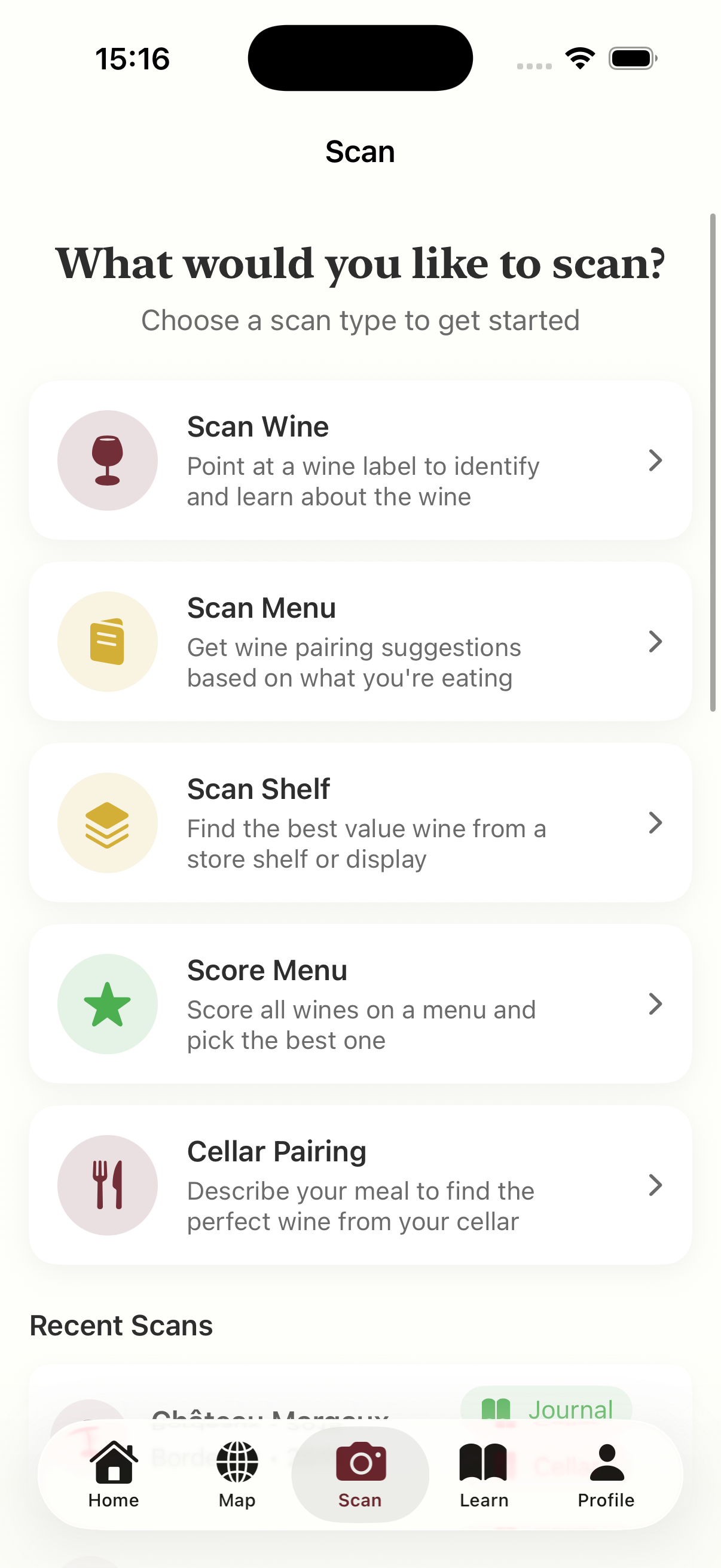
- AI label scanning that goes beyond identification. Point your camera at any bottle and Sommo tells you about the region, grape varieties, winemaking style, and what to expect in the glass. I wrote a deeper dive in the AI wine label scanning guide.
- Structured learning modules covering grape varieties, regions, tasting technique, and food pairing. Gamified with XP and levels, but not superficial — the content tracks closely with formal wine courses.
- A personal tasting journal with structured notes based on the Systematic Approach to Tasting. Log appearance, nose, palate, and conclusions, then get AI feedback on your notes.
- WSET exam prep with spaced repetition flashcards, quizzes, and mock exams across Levels 1 to 4.
- An interactive wine region map with over 1,000 regions, plus a wine cellar with AI food pairing suggestions.
Free tier: five lifetime scans and 30-day journal retention. Premium: $4.99/month or $29.99/year. No ads on either tier, and Sommo does not sell your data.
Why it wins on iPhone: Native SwiftUI performance, proper camera pipeline for scanning, iOS notifications for study reminders, and a privacy-first approach that fits how Apple users think about their data.
2. Vivino — Best for Quick Ratings
Vivino is the most popular wine app globally, with over 60 million users and the largest crowd-sourced database. Label scanning is fast, and community ratings give you a quick signal on whether a bottle is worth buying.
On iPhone: Vivino works well on iOS, though it is cross-platform rather than native. The main drawback is the ad-heavy free experience and the fact that it is designed for discovery and purchasing, not learning. Good for knowing what a wine scores; less useful for understanding why.
3. CellarTracker — Best for Collectors
CellarTracker is the tool of choice for collectors managing large inventories, with over 13 million tasting notes and detailed drink window recommendations. It also absorbed Delectable, adding professional sommelier reviews to the mix.
On iPhone: The interface has improved but still feels utilitarian. If you have 50 or more bottles and care about market valuations and optimal drinking windows, CellarTracker earns its place. For everyone else, it is more tool than it needs to be.
4. Wine-Searcher — Best for Price Comparison
Wine-Searcher is a price comparison engine, not a wine app in the traditional sense. It tells you where to buy a specific bottle at the best price, with merchant listings worldwide. No scanning, no tasting notes, no learning — just pricing data, done well.
On iPhone: Functional but bare-bones. Useful when you already know what you want to buy, but not a primary wine app.
What to Look for in an iOS Wine App
- Native performance. Does the app feel like it belongs on iPhone, or like a web page? Scrolling, transitions, and camera responsiveness all matter.
- Camera integration. Label scanning should work quickly, even in poor lighting. Test it at a restaurant, not just under your kitchen lights.
- Learning depth. Look for apps that teach you something, not just aggregate opinions.
- Privacy. Read the App Store privacy labels. Some wine apps collect and share a surprising amount of data.
- Offline access. Can you review tasting notes or study flashcards without a connection? Useful on flights, in cellars, or abroad without roaming.
The Bottom Line
For most iPhone users getting into wine, Sommo is the app I would start with. It is the only option that combines label scanning, structured learning, a tasting journal, and exam prep in a single native iOS app. Add Vivino if you want crowd-sourced ratings for shopping, and Wine-Searcher if you hunt for deals on specific bottles.
The best wine app is the one you actually use. But if your iPhone is already in your hand at every dinner and wine shop, you might as well make it teach you something.